Greater Than and Less Than Signs: Symbols, Meaning & Examples
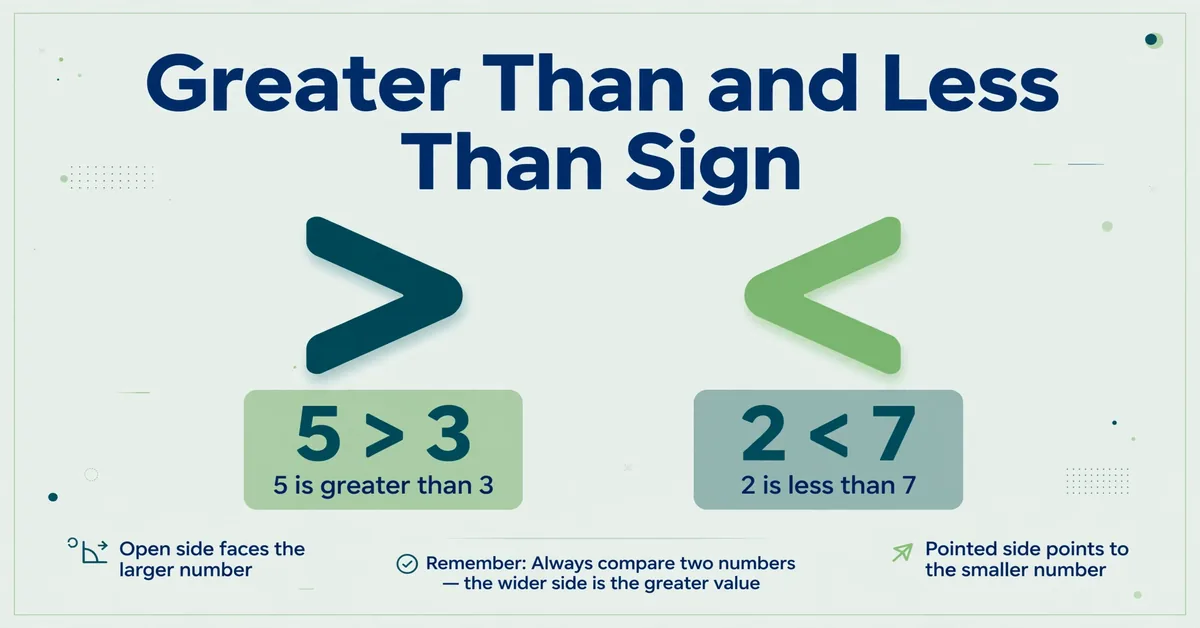
The greater than sign > means that the value on the left is greater than the value on the right. The less than sign < means that the value on the left is less than the value on the right.
For example:
8 > 5 means 8 is greater than 5.
3 < 7 means 3 is less than 7.
Greater Than and Less Than Signs to Copy and Paste
| Symbol | Meaning | Copy |
|---|---|---|
| > | Greater than | > |
| < | Less than | < |
| ≥ | Greater than or equal to | ≥ |
| ≤ | Less than or equal to | ≤ |
The easiest rule to remember is simple: the open, wider side faces the greater value, while the pointed side faces the smaller value.
Table of Contents
- What Are the Greater Than and Less Than Signs?
- Greater Than Sign >
- Less Than Sign <
- How to Remember Which Sign to Use
- The Open-Side Rule
- The Alligator Trick
- How to Use Greater Than and Less Than Signs
- Comparing Whole Numbers
- Comparing Decimals
- Comparing Negative Numbers
- Comparing Zero
- Comparing Equal Values
- Comparing Algebraic Expressions
- What Is an Inequality?
- Greater Than and Less Than Examples
- Greater Than or Equal To and Less Than or Equal To
- Strict and Non-Strict Inequalities
- Chained Inequalities
- How to Type > and < on a Keyboard
- On Windows
- On Mac
- On iPhone, iPad, and Android
- Greater Than and Less Than in Programming
- Greater Than and Less Than in Excel and Google Sheets
- HTML Codes for Greater Than and Less Than Signs
- Unicode Information
- Common Mistakes to Avoid
- Quick Reference Table
- FAQs
- Conclusion
What Are the Greater Than and Less Than Signs?
The greater than sign > and less than sign < are mathematical comparison symbols. They show how one value relates to another.
- means greater than
- < means less than
- = means equal to
For example:
9 > 4
This means 9 is greater than 4.
2 < 6
This means 2 is less than 6.
Both signs are used in arithmetic, algebra, statistics, spreadsheets, programming, and other technical contexts.
The symbols > and < are officially named GREATER-THAN SIGN and LESS-THAN SIGN in Unicode. Their code points are U+003E and U+003C, respectively. (Unicode)
Greater Than Sign >
The greater than sign is:
Use it when the value on the left is greater than the value on the right.
Examples:
- 10 > 7
- 25 > 12
- 100 > 99
Read 10 > 7 as:
“Ten is greater than seven.”
The open side of > faces the greater value.
Less Than Sign <
The less than sign is:
<
Use it when the value on the left is less than the value on the right.
Examples:
- 3 < 8
- 15 < 20
- 45 < 100
Read 3 < 8 as:
“Three is less than eight.”
The open side of < faces the greater value.
How to Remember Which Sign to Use
The two symbols look similar, so it is easy to reverse them. The easiest way to remember them is to focus on the shape of the symbol.
The Open-Side Rule
The open side faces the greater value.
For example:
7 > 3
The wider, open side faces 7, which is greater.
Likewise:
3 < 7
The wider, open side still faces 7.
The pointed end faces the smaller value.
So remember:
Open side → greater value
Pointed side → smaller value
This works when comparing whole numbers, decimals, negative numbers, and many other numerical values.
The Alligator Trick
A common beginner memory trick is to imagine > or < as a hungry alligator’s open mouth.
The imaginary alligator “wants” to face the larger number.
For example:
8 > 2
The open mouth faces 8.
This can be a useful way for children to remember the symbols, but the open-side rule is the more direct mathematical explanation.

How to Use Greater Than and Less Than Signs
To compare two values:
- Look at the two values.
- Determine which value is greater.
- Put > or < between them.
- Check that the open side faces the greater value.
For example, compare 14 and 9.
Because 14 is greater:
14 > 9
If you reverse the order, you must reverse the comparison:
9 < 14
Both statements describe the same relationship.
Comparing Whole Numbers
Whole numbers are straightforward to compare.
| Values | Correct comparison |
|---|---|
| 20 and 5 | 20 > 5 |
| 6 and 18 | 6 < 18 |
| 75 and 50 | 75 > 50 |
| 31 and 42 | 31 < 42 |
When comparing positive whole numbers, the number with the greater numerical value is greater.
Comparing Decimals
The same comparison symbols work with decimals.
For example:
4.8 > 4.2
because 4.8 is greater than 4.2.
Another example:
1.35 < 1.50
because 1.35 is less than 1.50.
Trailing zeros do not change the value of a decimal:
2.5 = 2.50
Therefore:
2.50 > 2.45
You can add zeros to the right of a decimal to make comparison easier without changing its value.
Comparing Negative Numbers
Negative numbers can be more confusing because their numerical digits do not tell the whole story.
On a number line, values farther to the right are greater, while values farther to the left are smaller.
For example:
-2 > -5
Although 5 is greater than 2 as a positive number, -2 is greater than -5 because -2 is farther to the right on the number line.
Similarly:
-10 < -3
because -10 is farther to the left.
Among negative numbers, the number closer to zero is greater.
Comparing Zero
Zero can be compared with both positive and negative numbers.
Examples:
- 0 < 5
- 0 > -3
- -7 < 0
- 12 > 0
On a number line, every positive number is greater than zero, and every negative number is less than zero.
Comparing Equal Values
If two values have exactly the same value, neither > nor < is correct.
Use the equals sign = instead.
For example:
5 = 5
These statements are incorrect:
5 > 5
5 < 5
The correct comparison is:
5 = 5
Comparing Algebraic Expressions
Greater-than and less-than signs are also used with variables and expressions.
For example:
x + 3 > 10
This means that the value of x + 3 is greater than 10.
Another example is:
2x < 14
This means that 2x is less than 14.
In algebra, a comparison involving a variable is called an inequality.
What Is an Inequality?
An inequality is a mathematical statement that compares two values or expressions using symbols such as:
- <
- ≥
- ≤
For example:
x > 5
means that x is greater than 5.
An inequality can have many possible solutions. For example, if x is a real number:
x > 5
is true for 6, 7, 10, 100, 5.5, and many other values.
By contrast:
x = 5
has only one value for x.
The symbols > and < are called strict inequality symbols because they do not allow the two sides to be equal.
Greater Than and Less Than Examples
Here are examples using different types of values:
| Expression | Meaning |
|---|---|
| 12 > 7 | 12 is greater than 7 |
| 4 < 9 | 4 is less than 9 |
| 100 > 25 | 100 is greater than 25 |
| 0 < 3 | 0 is less than 3 |
| -2 > -6 | -2 is greater than -6 |
| 1.2 < 1.8 | 1.2 is less than 1.8 |
| 50 = 50 | Both values are equal |
| x > 10 | x is greater than 10 |
| x < 20 | x is less than 20 |
What Happens When You Reverse the Numbers?
When you reverse the order of a comparison, the symbol must also reverse.
For example:
8 > 3
becomes:
3 < 8
Both statements are equivalent.
Likewise:
4 < 12
can be rewritten as:
12 > 4
This is an important rule to remember when reading or rearranging inequalities.
Greater Than or Equal To and Less Than or Equal To
Sometimes a value can be greater than another value or equal to it.
Mathematics uses two additional symbols for these situations:
- ≥ = greater than or equal to
- ≤ = less than or equal to
Greater Than or Equal To ≥
The symbol ≥ means that the value on the left is either greater than or equal to the value on the right.
For example:
x ≥ 10
This means:
x is 10 or greater.
Possible values include:
- 10
- 10.5
- 11
- 25
- 100
Any real number greater than or equal to 10 satisfies the inequality.
Less Than or Equal To ≤
The symbol ≤ means that the value on the left is either less than or equal to the value on the right.
For example:
x ≤ 20
This means:
x is 20 or less.
Possible values include:
- 20
- 19
- 10
- 0
- -5
Any real number less than or equal to 20 satisfies the inequality.
How the Symbols Are Built
You can think of these symbols as combining a comparison sign with equality:
- = → ≥
- < + = → ≤
The single Unicode characters ≥ and ≤ are the standard mathematical symbols. Their Unicode code points are U+2265 and U+2264. (Unicode)
Strict and Non-Strict Inequalities
There are two useful categories of inequality symbols.
Strict inequalities
The symbols:
- <
are strict inequalities because equality is not allowed.
For example:
x > 5
means x must be greater than 5, not equal to 5.
Likewise:
x < 10
means x must be less than 10, not equal to 10.
Non-strict inequalities
The symbols:
- ≥
- ≤
allow equality.
For example:
x ≥ 5
allows x to equal 5 or be greater than 5.
x ≤ 10
allows x to equal 10 or be less than 10.
This distinction is especially important when solving algebraic inequalities.
Chained Inequalities
You can sometimes use two inequality symbols in the same statement.
For example:
3 < x < 10
This means:
x is greater than 3 and less than 10.
Some possible values are:
- 4
- 5
- 6.5
- 9.99
But 3 and 10 themselves are not included because the inequality uses < rather than ≤.
A non-strict version would be:
3 ≤ x ≤ 10
This means x can be any value from 3 through 10, including both endpoints.
How to Type > and < on a Keyboard
On a standard U.S. keyboard, the less-than and greater-than signs share keys with the comma and period.
| Symbol | Keyboard shortcut |
|---|---|
| < | Shift + comma (,) |
| > | Shift + period (.) |
Keyboard layouts can vary by country and language, so these shortcuts may differ on some physical keyboards.
On Windows
To type the less-than sign <:
Shift + ,
To type the greater-than sign >:
Shift + .
These shortcuts use the comma and period keys on a standard U.S. keyboard.
On Mac
On a standard U.S. Mac keyboard:
Less than <: Shift + ,
Greater than >: Shift + .
The same key combinations are used because < and > share the comma and period keys on the standard U.S. layout.
On iPhone, iPad, and Android
On phones and tablets, the symbols are normally available through the numbers or symbols keyboard.
A typical method is:
- Open the keyboard.
- Tap 123, ?123, or the symbols key.
- Find < and >.
- Tap the symbol you need.
The exact location can vary depending on the device, keyboard app, language, and operating system.
Greater Than and Less Than in Programming
The characters > and < are also widely used in programming.
In many programming languages, they function as comparison operators.
For example:
age > 18
checks whether age is greater than 18.
Similarly:
age < 18
checks whether age is less than 18.
Many programming languages use:
age >= 18
for greater than or equal to, and:
age <= 18
for less than or equal to.
In programming, >= and <= are commonly written as two-character operator sequences instead of using the single Unicode mathematical symbols ≥ and ≤.
Programming syntax varies by language, so operators should always be checked against the rules of the particular language being used.
Greater Than and Less Than in Excel and Google Sheets
Greater than and less than signs are used every day in spreadsheets, where they compare cell values inside formulas. The comparison returns TRUE when the statement is correct and FALSE when it is not.
For example, if cell A1 holds a test score:
=A1>50
returns TRUE when the score is above 50, and FALSE when it is 50 or below.
The most useful formulas are:
- =IF(A1>100, “Pass”, “Fail”), shows “Pass” when the value in A1 is greater than 100, otherwise “Fail”.
- =COUNTIF(A:A, “>100”), counts how many cells in column A are greater than 100. Note the quotes: inside COUNTIF, the comparison goes in quotes.
- =SUMIF(A:A, “<50”), adds up only the values in column A that are less than 50.
- =A1>=B1 and =A1<=B1, the two-character forms for greater than or equal to and less than or equal to. Spreadsheets do not accept the single symbols ≥ and ≤ in formulas.
You can also use these signs without formulas. In Excel, select the cells, then go to Home, then Conditional Formatting, then Highlight Cells Rules, then Greater Than, and pick a value, every cell above that value is highlighted automatically. In Google Sheets, the same rule is under Format, then Conditional formatting, then “Greater than”.
For the not-equal comparison in spreadsheets, see our guide to the does not equal sign, which explains the <> operator.
HTML Codes for Greater Than and Less Than Signs
The < and > characters have special roles in HTML markup. In particular, < is used to begin tags, so a literal less-than character in HTML text can be represented with the named character reference <.
The corresponding HTML character references are:
| Character | HTML character reference | Unicode |
|---|---|---|
| < | < | U+003C |
| > | > | U+003E |
The HTML Standard lists lt and gt among its named character references. HTML also supports numeric character references. (HTML Living Standard)
Less Than in HTML
Instead of writing a literal < where a character reference is needed, you can use:
5 < 10
The browser displays:
5 < 10
Greater Than in HTML
You can write:
10 > 5
which displays:
10 > 5
For a symbol website, the character references are particularly useful when displaying these characters within HTML source code.
You can also use numeric character references:
<
or:
<
for <, and:
>
or:
>
for >.
HTML character references begin with an ampersand and can use named or numeric forms. (HTML Living Standard)
Unicode Information
The greater-than and less-than characters are standard Unicode characters.
| Symbol | Unicode code point | Unicode name |
|---|---|---|
| < | U+003C | LESS-THAN SIGN |
| > | U+003E | GREATER-THAN SIGN |
| ≤ | U+2264 | LESS-THAN OR EQUAL TO |
| ≥ | U+2265 | GREATER-THAN OR EQUAL TO |
Unicode identifies U+003C as LESS-THAN SIGN and U+003E as GREATER-THAN SIGN. It also defines U+2264 as LESS-THAN OR EQUAL TO and U+2265 as GREATER-THAN OR EQUAL TO. (Unicode)
These characters are useful when you need to copy and paste mathematical notation directly into documents, websites, messages, spreadsheets, or other applications.
Common Mistakes to Avoid
1. Reversing the symbol
A common mistake is writing:
3 > 9
when you mean that 3 is less than 9.
The correct expression is:
3 < 9
Remember that the open side faces the greater value.
2. Looking only at the pointed end
The pointed end faces the smaller value.
For example:
3 < 8
The point faces 3, while the open side faces 8.
3. Forgetting the rules for negative numbers
Do not assume that the negative number with the larger digits is greater.
For example:
-3 > -8
because -3 is closer to zero and is farther to the right on a number line.
4. Using > or < for equal values
If two values are equal, use =.
Correct:
12 = 12
Incorrect:
12 > 12
12 < 12
5. Forgetting to reverse the sign when reversing an inequality
If:
5 < 10
then reversing the order gives:
10 > 5
not:
10 < 5
6. Confusing > and ≥
These symbols are not interchangeable.
x > 5 means x must be greater than 5.
x ≥ 5 means x can be 5 or greater.
7. Confusing < and ≤
Similarly:
x < 10 means x must be less than 10.
x ≤ 10 means x can be 10 or less.
8. Confusing mathematical and programming notation
Mathematics commonly uses:
x ≥ 5
Many programming languages use:
x >= 5
They represent the same comparison idea, but they belong to different notation systems.
Quick Reference Table
| Symbol | Name | Meaning | Example |
|---|---|---|---|
| > | Greater than | Left value is greater | 8 > 3 |
| < | Less than | Left value is less | 3 < 8 |
| = | Equal to | Both values are equal | 5 = 5 |
| ≥ | Greater than or equal to | Left value is greater or equal | x ≥ 10 |
| ≤ | Less than or equal to | Left value is less or equal | x ≤ 10 |
The easiest rule to remember
Open side → greater value
Pointed side → smaller value
So:
9 > 4
and:
4 < 9
are both correct.
FAQs
What is the greater than sign?
The greater than sign is >. It means that the value on the left is greater than the value on the right.
For example:
10 > 6
means “10 is greater than 6.”
The open side of the symbol faces the greater value.
What is the less than sign?
The less than sign is <. It means that the value on the left is less than the value on the right.
For example:
4 < 9
means “4 is less than 9.”
The open side faces 9, the greater value.
Which symbol means greater than?
The symbol > means greater than.
For example:
15 > 10
means 15 is greater than 10.
Which symbol means less than?
The symbol < means less than.
For example:
5 < 12
means 5 is less than 12.
Which way does the greater than sign point?
The greater than sign > has its open side facing the greater value and its pointed end facing the smaller value.
For example:
8 > 3
The open side faces 8.
Which way does the less than sign point?
The less than sign < also has its open side facing the greater value.
For example:
3 < 8
The open side faces 8, while the point faces 3.
How do I remember the greater than and less than signs?
Remember:
Open side = greater
Pointed side = smaller
You can also imagine the symbol as a hungry alligator whose open mouth faces the larger number.
What is the difference between > and <?
means the left value is greater than the right value.
< means the left value is less than the right value.
For example:
9 > 5
but:
5 < 9
Both expressions describe the same relationship.
What is the difference between > and ≥?
means greater than only, so equality is not allowed.
≥ means greater than or equal to, so equality is allowed.
For example:
x > 5 excludes 5.
x ≥ 5 includes 5.
What is the difference between < and ≤?
< means less than only.
≤ means less than or equal to.
For example:
x < 10 excludes 10.
x ≤ 10 includes 10.
Can greater than and less than signs be used with negative numbers?
Yes. The same comparison rules apply.
For example:
-2 > -5
because -2 is farther to the right on a number line.
Similarly:
-8 < -3
because -8 is farther to the left.
Can you use greater than and less than signs with decimals?
Yes. You can compare decimals using the same symbols.
For example:
4.75 > 4.5
and:
1.25 < 1.8
Trailing zeros do not change a decimal’s value, so:
2.5 = 2.50
What are ≥ and ≤ called?
≥ is called greater than or equal to.
≤ is called less than or equal to.
They are non-strict inequality symbols because they allow the two sides to be equal.
What is an inequality?
An inequality is a mathematical statement comparing two values or expressions using symbols such as >, <, ≥, or ≤.
For example:
x > 5
is an inequality stating that x is greater than 5.
What does 3 < x < 10 mean?
It means that x is greater than 3 and less than 10.
The values 3 and 10 are not included.
For example, 4, 5, and 9.5 satisfy the inequality.
How do you type the greater than sign on a keyboard?
On a standard U.S. keyboard, press:
Shift + .
This produces:
How do you type the less than sign on a keyboard?
On a standard U.S. keyboard, press:
Shift + ,
This produces:
<
How do you type greater than and less than signs on a phone?
Open the numbers or symbols keyboard, usually by tapping 123, ?123, or a similar key. Then locate < and >.
The exact position varies by device and keyboard app.
What are the greater than and less than signs in HTML?
In HTML, the named character references are:
- < → <
- > → >
For example:
5 < 10
displays as:
5 < 10
The HTML Standard defines these named character references. (HTML Living Standard)
What are the Unicode codes for greater than and less than?
The Unicode code points are:
- < = U+003C LESS-THAN SIGN
- = U+003E GREATER-THAN SIGN
- ≤ = U+2264 LESS-THAN OR EQUAL TO
- ≥ = U+2265 GREATER-THAN OR EQUAL TO (Unicode)
Are >= and <= the same as ≥ and ≤?
In many programming languages, >= is used for greater than or equal to, while <= is used for less than or equal to.
Mathematical writing normally uses the single symbols ≥ and ≤.
The meaning is generally equivalent, but the notation depends on the context.
How do you use greater than and less than in Excel?
In Excel and Google Sheets, type the comparison straight into a formula, for example =A1>50, which returns TRUE or FALSE. For counting or adding, use COUNTIF or SUMIF with the comparison in quotes, for example =COUNTIF(A:A, “>100”). For greater than or equal to, type >= and for less than or equal to, type <=, because spreadsheets do not accept the single symbols ≥ and ≤ in formulas.
Conclusion
The greater than sign > means that the value on the left is greater than the value on the right, while the less than sign < means that the value on the left is less than the value on the right.
The easiest way to remember both symbols is:
The open side faces the greater value.
For example:
9 > 4
and:
4 < 9
When the two values are equal, use =. When equality is also allowed, use ≥ or ≤.
These symbols are used in basic arithmetic, algebra, inequalities, programming, HTML, spreadsheets, and many other technical contexts. On a standard U.S. keyboard, you can type < with Shift + comma and > with Shift + period.
If you need the symbols quickly, copy them here:
< ≥ ≤

Jack Harrison is a contributor at Square Root Signs, sharing creative ideas, useful information, and engaging content to help readers discover something valuable with every visit.